Optical Transceiver Testing

These are some of the instruments required for testing an Optical Transceiver.
Instruments
DCA (for eye diagram, mask Test, Jitter)
Bert[Bit Error Rate tester] for testing Data Bit Error Rates vs time and Random Data Pattern Source, Clock Source.
Optical Source
Optical Power Meter
Optical Attenuator
RF Attenuator
Optical Switches/Switching
Fiber Connector Adapters
Optical Splitter
Fiber cables
Fiber cleaning  device
Here are some articles on the subject.
By Agilent
By JDSU
By Anritsu
Posted in Test Sector | Tagged | Leave a comment

Hardware IO list important step for Software Programmer

Before a software can implement assignment for AD ,DA , DIO, DMM, Function Generator, etc. you need to know the Hardware IO List. assignment
The Hardware Engineer(which may also be the Software Engineer) most likely will have created this list to keep track of what pin or IO type are available.
If the person in charge of the Hardware section of the project did not create this list , you may have to review the schematic/block diagram and create the list yourself.
It should have Signal Name, I/O Type, Direction(out,in, and bidir),Pins(signal and ground), expected voltage would be nice(help select best range for multi range devices).
Example Hardware IO List
SignalName     Device    DeviceConnector  Type         Direction Channel/Port   Pins  Expected_Range
SignalName1    DAQ1    (Connector1)         Analog     Out              0              10,50   0–9.99V
SignalName2,   DAQ1    (Connector2)         Digital        In           Port0 Bit0      20,25,  0/5V
MS’s EXCEL  if an excellent application for this effort. which can also help you sort information for quick checkout.
I would be a good idea to place this list in your Engineering log book as well since you will refer to the list many time during integration and checkout.
Also place information about the I/O on one LabVIEW vi menu (ex.call Hardware List I/O) which can help you and future Engineers which have to add enhancement.
Posted in Test Sector | Tagged | Leave a comment

Load Resistor and Current Sensing Resistor wiring.

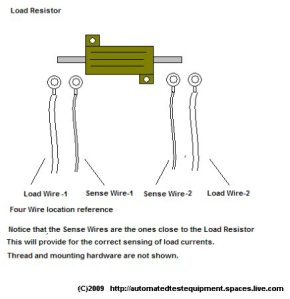
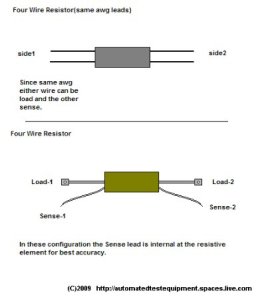
Load Resistor wiring must be must be in a correct order to maintain the best accuracy for monitoring the voltage across the Load Resistor.
Sensing wires which are used to monitor the voltage across the resistor should be as close to the resistive element as possible.
This illustrations below show the proper location of the Load and Sense wiring.
 
Load and Current Sensing resistor and be found in the List Section below(ex Newark, DigiKey).
Posted in Test Sector | Tagged , | Leave a comment

Test Report – Typical Format

Below is a typical format used in test report.
This can be txt or html.
LabVIEW has report gen tools.
Some Test reports can also in images (ex Scope captures images)
If you are using TestStand to create  the Test Report you will most likely need to modify the Reportgen.seq and UUTInfo data type.
Although not show below the Test Completed Date,Time are sometimes included in the report.
For the Pass/Fail Column make  a Failed test stand out for example “**Fail**”. This will make it easier to spot on the report.
   LabVIEW and TestStand mention about are National Instruments Products.
Posted in Test Sector | Tagged , | Leave a comment

Signal Quality with DCA , Eye Diagram, and Mask

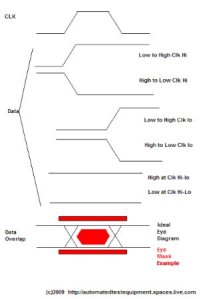
One of the methods used for checking signal quality is overlapping DATA signal with respect to a clock (clk).
Persistence must be ON for the overlapping of the DATA signal.
Jitter is the variation of the timing in the signal relative to the trigger (clk)
Jitter has many components  such as but not limit to : Jitter Peak-Peak (JitterPP),Jitter RMS,Total Jitter( Jitter measurement are on  the X of the eye diagram.
One of the instrument used for this type of measurement is Agilent’s 86100C DCA-J  (J for jitter).
An additional test is the use of  Mask Pattern
The Mask Pattern maybe established by the industry for the specific communication used or
it may be provided by the customer. Some Instrument will have the standard Mask in their library.
If not you may have to make you own Mask using line segments via your software development tool.
If your Jiitter seems excessive on a known good UUT — look at the trigger make sure it’s what you expect.
A source which creates random data signal is used to drive the  (ex transceiver)
Here are some addition links to Eye Diagram and Agilent’s 86100C DCA-J
Evaluation Engineering’s acticle: on Optical Transceiver : http://www.evaluationengineering.com/enews/2008_November/1108_optical.aspx
EDN’s info on eye diagram: http://www.edn.com/article/CA200381.html
Posted in Test Sector | Tagged , | Leave a comment

Rack Panel Power/Motor wiring

You did a great job of putting your high Power  pins AWAY from your small signal (analog and digital).
Also:
  • Document on the schematic/assembly drawing where and what type wiring to use.
  • Tell the  technican/assembler to keep certain wires harnessed away from the signal you need to protect.(ex left side power,right side protected)
  • If you are using two pins and two wires for one power signal ,Make it clear on the schematic and  the  tech that you want TWO wires from on side to the other not ONE wire and a  two little  jumper at each end.
  • Keep your power supply sensing wires away(shielded) from the power wires harness( or you may get  ripple on your PS output)
  • Motor Wiring must also be keep away from your small signal harness.
  • Check your pin contact rating and the guage of wire it will accept.
  • Check the wiring guage for you current requirements.
  • Voltage rating of wires and connector voltage rating.

Remember before any wiring is started, inform the technican/assembler of the harness routing concerns.

There may be additional concerns not listed above which depend on your specific project.

Do not consider the above list  or any other list in the blog as your only concerns on the subject.

Posted in Test Sector | Tagged , | Leave a comment

Self Test Fixture

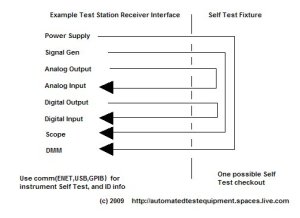
Some customers request a Self Test Fixture to checkout the Test Station via the interface connection which are normally used by the  UUT.
In designing the Self Test Fixture you need to keep it simple but complete.
Most often outputs are paired to inputs( wraparound).
example
Analog Out to Analog In
Digital Out to Digital In
Signal Generator to Scope
Power Supply to DMM
Via the comm link(ENET,GPIB,USB,RS232)  perform the Self Test for each instrument  This will check the comm and instruments.
At the same time Logging the ID of each instrument can be handy for Instrument S/N, firmware version reference.
Use signal conditioning as needed to protect the inputs. Loads may be need  to UUT simulated load condition.
All test station interfaces are different and you must know what can be wraparound without damaging the output or the input instrument.
You must have a good understanding of the instruments and signal types.
Initially program instruments output with  small signal levels during software checkout.
Posted in Test Sector | Tagged | Leave a comment

Test Engineer’s Round Table

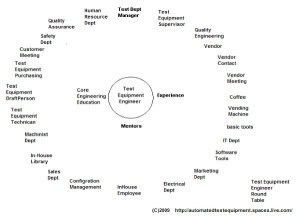
Yes, you do have a Round Table- and it is a big support team
 
Posted in Test Sector | Leave a comment

Probing the Test Fixture’s UUT connector

When probing the Test Fixture’s  UUT connector use the matching pin that is made for the connector.
Not using the correct mating pin or contact will damage the reliability of the connection when the UUT is connected.
Most UUT Connectors and Test Fixture connectors are expensive and repair will involve:
  • Getting someone who know how to use extraction/insertion/crimping or soldering tools
  • pin removal ( if the connector even allows pin removal, if not then it a BIG JOB– connector removable),
  • wire to pin removed
  • new pin insertion
  • wiring to pin
  • checkout / re-validation of the Test Fixture or ITA.

Each step above is TIME=Money and Time away from your intented task.

So do yourself a favor find the connector’s mating pins or contact and leave the paper clip for holding papers and the big gauge wire for wiring.
Make a set of insulated wire leads using the mating pins for use during checkout ahead of time and put a heat shrink tubing to prevent shorts.
Even if you are using a “connector saver” the above recommendation still applies.
Breakout ,pinjack  may provide  protection again damaging or touching  of the Test Fixture’s UUT connector(do not breakout high frequency or high voltage pins).
You need to inform anyone working on your Test Fixture checkout (ex initial continuity of the test fixture) of the above concern or they will Jam the big test probe into the connector contacts and your test fixture reliability will be off to a bad start.
Posted in Test Sector | Tagged | Leave a comment

Keep your Test Equipment Manager in the loop

It is important to keep your Test Equipment Manager informed of the following:
  • cc Status(once a week). I will have a separate blog on subject.
  • Anytime there is something preventing you from performing your assigned task.
  • Change is scope of project which will have Major impact on TIME and COST.
  • Hours worked on project(s).
  • Any Requested updates.
  • Safety concerns
Message to TE Engineer:
Remember Most of your interaction will be with your project team and Supervisor NOT your Manager.
Your Manager has many projects,department meetings,a zillion emails, this  is the reason a Supervisor was assigned to a project.
Posted in Test Sector | Tagged | Leave a comment