NI-FPGA and Examples.

Have you selected National Instruments FPGA 78XXR series board or CompactRIO chassis/module for your solution?
Look at the following site to get ideas on how others have solved an opportunity using RIO FPGA.
Search for FPGA function and examples at the National Instruments(r) Site or goto:
Posted in Test Sector | Tagged , | Leave a comment

Ran out of Analog Ports on your 78XXR series board

Ran out of  Aanlog Ports on your NI 78xxR series board and have one unused DIO connector?
 
No problem.
Condiser the following option.
 
If you run out of Analog ports on you FPGA 78xx R series board
consider an the R Series Expansion Chassis. It uses an unused DIO connector(Not MIO connector).
Measurement Explorer knows how to handle the fact that the Expansion Chassis is now a subset of the 78xxR board.
Dont forget to also order:
the C series I/O modules need for the additional IO operation.
And cable for needed connecting to the 78xx series board.
R Series 78XX boards (for PXI and PCI)
http://sine.ni.com/nips/cds/view/p/lang/en/nid/202005
 
 
National Instruments web site is  www.ni.com .
Posted in Test Sector | Leave a comment

Software and Revision

During the course of your software task you will need a way to keep track of offical release of your software’s revision.
 
Fortunely their are applications which help in this area.
 
These applications use a check-in  check-out  procedurce to track:
Date of changes
Who made a change.
Why was a change made.
Current condition of the code(checkin or checkout)
 
Check-in is a procedure to get a piece of code or any electronic content from you pc to a controlled database.
Check-out is the procedure to get a piece of code out the controlled database.
 
Each time the procedures occur a history is made in the database to help keep track of different version of the code.
 
A piece of code/ or application can have many versions before it is accepted as a release for used.
 
Configuration Management uses the final version information to lock down the version for the particular Revision.
 
Two Software Configuration Management(SCM) application examples are:
 
       Microsoft SourceSafe( LV has an integration to this application)
       IBM Rational ClearCase( More elaborate document control)
 
What happen in some case a testStation pc will not be connected to the intranet.
In this case make it a habit to do incremental backup and at the end of the day checkout the old sw and check in the end of the day copy.
 
Always do backup so you will not loss a whole day of effort for some unforseen issue.
 
Procedure for checkin/checkout may be outlined by your department.
 
 
SourceSafe is a product of Microsoft
Rational ClearCase is a product of IBM
 
 
Posted in Test Sector | Leave a comment

Resolution, Accuracy and Calibration

First, resolution and accuracy  are not the same.
 
An 6Digit meter gives no indication of its accuracy , for all you know a 5digit meter may be more accurate then the 6digit meter.
accuracy has a connection to a calibration standard. How good can this meter report true 1Volt dc for example ?
 
To maintain accuracy instruments must be calibrated over time.
 
Measuring Instrument state their accuracy within a calibration window ( 1 year will be less accurate the 3month calibration window)
 
Which time window you will calibrate depends on what accuracy you must meet for your products test specification.
 
When you get a project and you are given spec to meet(+/- limits) you measuring device must be X time better the the spec.
Look over all the spec which will be using the same  measuring instrument(ex via switching matrix) so the accuracy is sufficient for all involved.
 
Calibration departments keep records to know when an instrument time has come up for calibration.
 
The Calibration department typically  have even higher accuracy equipment or send equipment out to manufacturers or calibration facility.
 
A national standard is the ultimate source of reference and the paper trail will show a connection from a national standard to your measuring equipment.
 
Posted in Test Sector | Leave a comment

USB-6008 and LabVIEW SignalExpress

Subject: NI Low Cost USB-6008 with "LabVIEW SignalExpress LE" (not LabVIEW)
 
If you look at the USB-6008 spec on NI site (Keep in mind that the analog outputs are  software timed =set Signal Value at a time). 
This will prevent you from using SignalExpress to doing Continuous or NSamples on the outputs(which require a hardware timed USB daq).
If you need to do hardware timed task(for continous or NSample) type conditions look into NI USB M Series type USB daq.
==========
 
Next I will discuss about LabVIEW SignalExpress and LabVIEW.
 
The reason  for the  (not LabVIEW) on the top is that the two products are very different, but the name of the data logger looks like you may be getting LabVIEW and SignalExpress (IT is not so).
 
"LabVIEW SignalExpressLE(lite edition)
"LabVIEW SignalExpress"                       = Application for datalogging/and datalogging related task(main focus)
"LabVIEW"                                           = A powerful graphical programming tool for creating Applications.
 
If someone tell you they only want to acquire data( LabVIEW Signal Express is a posibility)
If someone tells  you they need an application to acquire and  control consider a programming tool.
I would lean to the programming tool side for the ever popular "Oh, I need it to do this also, if it does that" request.
Related Site:
  USB-6008 spec or                  http://www.ni.com/pdf/products/us/20043762301101dlr.pdf
  USB DAQ                              http://www.ni.com/dataacquisition/usb
 
 
LabVIEW and "LabVIEW SignalExpress" are products of National Instruments.
Posted in Test Sector | Leave a comment

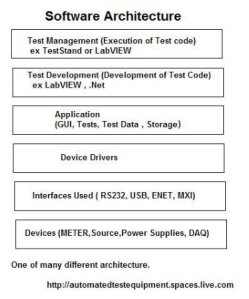
Software Architecture

To show how the various major software components will interact create a Software Architecture.
 
Add the major block from tools that will be used for implementation to the actual hardware that needs to be controlled.
 
Below is one such example.  Flow arrow should be added to show relationship.
 
LabVIEW and NI-TestStand are  National Instruments products.
 
Posted in Test Sector | Leave a comment

Panel Enclosure and AC

At times you will need to add an AC interface to you panel’s enclosure.
 
One such interface is the IEC type sockets and plugs.
Consider those with AC line filtering built in.
 
The sockets come in  flange mount and snap mount types.
 
For more information on these type of connector refer to:
 
Some have fuses and on/off switches built-in.
 
Check  component vendors listed below.
 
Below is an image of a  IEC C14 type flanged socket( not to scale)


Posted in Test Sector | Leave a comment

First Time LabVIEW User Dont and Do

Are you a first time LabVIEW
 
Dont
Do not use one loop for your top level application requiring user interaction.
 
Do
Do Use a event/queue(producer / consumer) loops
====================================
 
Dont
Do not use infinity  controls input crossing your structure all over the place.
 
Do
Do Consider clustering related information , ex Test Configuration data , Logging Data, Testing Maintance Data, Report Data etc
Data flow Left to Right  Input on left , Output on right
=====================================
Dont
Do not Create all of you code in ONE vi  this will require infinite monitor to view your code.
Do not Use nested structure to infinity level.
 
Do
Do create Sub VI  to modularize your application.
========================================
Dont
Do not forget Error in and Error out
 
Do
Do  Connect you error chain and acutally handle the errors (ex error opening a file then why are you attemping to write or read from it-  handle the errors)
Also Error chain help with execution ( order in which Sub vi or vi are executed.) So stop using so many framed sequence when you should have continued the error chain.
==============================================
Dont
Dont think in just serial program with LabVIEW
 
Do
Think how a  parallel flow can improve your application.( This is a powerful feature of LabVIEW). Take care of the parallel flow of errors also.
==============================================
 
Dont
Do not just open a session to an instrument.
 
Do
Do Close session that are open at the ending of you application.
 
====================================================
 
LabVIEW is a registered trademark of National Instruments.
check out the National Instruments site for additional information(listed below).
Posted in Test Sector | Leave a comment

Need to make a PCB(Printed Circuit Board)

Sometime you need to make a PCB for your in-house test station/enclosure and your facility does not have a PCB dept to address your needs.
 
(Hopeful you have already checkout that no vendor has what you need, so you dont have to create something from scratch.)
 
I will be tring out a vendor that supplies  software for you to create the schematic and layout then they make the PCB.
 
I will use this section to report on the vendor’s software….
 ===========
 Update: Dec 09 2008
  • The PCB vendor’s software download just fine: No issues detected.
  • The install process : No issues detected.
  • Two application one for schematic and one for routing.
  • Schematic application: No issues detected.
  • Pcb application: No issues detected.
Creating a schematic help with the next application so you can see pad that are related to a net(point that need to be connect).
With the Schematic do the check net task for any sw discovered issues with your schematic.
I have used both application and so far all look promising and easy to use.
 
 
Stay tune for updates and evaluation  …..
 Dec 12 2008
All three boards arrived as per the email.  Excellent.
I used www.expresspcb.com MiniProto service (double sided,fix size,3 pieces).
 
When you dont have a pcb department, and you being ask to get your prototype  on pcb check out www.expresspcb.com
Use the BOM,schematic,pcb files as the configuration control file for your PCB and add www.expresspcb.com on the documentation.
Take the schematic and the component  images as is or give it to your drafting dept if required.
 
Posted in Test Sector | Leave a comment

Outside – Inside Connectivity

Many instances you will need to connect to common interfaces(USB,GPIB,ENET,RS232).
 
Bulkhead are connectors interface made to allow station’s internal cable/connector access to outside connector/cable.
Bulkhead are typically mounted on 19in rack panels 
 
Box /Panel mount connector are another method to allow interface to the test station from the outside.
 
For the common interface mention above look at this site for ideas L-com :  www.L-com.com     they also have different blank panels and shelfs.
 
Posted in Test Sector | Leave a comment