USB-1208FS-Plus (Digital Out)

Data Acquisition Help

USB-1208FS-Plus

(a Measurement Computing product)

This site is not connected with Measurement Computing or National Instruments

This site is not endorsing any product.

Below is some useful information as to setup for the USB-1208FS-Plus device with respect to the Digital out

Two Channel setup

Used Measurement Computing’s ULx for LabVIEW® example as a start point. (LabVIEW® is a trademark of National Instrument) (ULx is a MC product)

Note NO wiring was done. Use caution as per your own wiring if running an example. Must have knowledge of Electronics.

Do NOT connect two outputs together as Device my get damaged.

Key focus here is on the setup as it relates to the USB-1208FS-Plus

No Clock (this was the only option that worked for me)

Max Rate 200Hz (must be using some internal clock) (the analog input is the Fast Sampling 50Ks/sec (one channel))

Device USB-1208FS-Plus (a product of Measurement Computing)
Subject Multiple Digital out lines using the OneChannelForEachLine Method
Example used C:\Program Files (x86)\National Instruments\LabVIEW 20nn\examples\ULx\Digital\Generate Values.llb\ULx Write Dig Chan…. nn=your LV verrsion
Programming Lang LabVIEW® a product of National Instruments.
Operating System used Windows 10 (a product of Microsoft)
Intent To show how to setup the Parameters for multiple Digital lines (channels) for this particular device
Tags USB-1208FS-PLUS
Prerequisite Measurement Computing Istacal was run so you device is recognized
Comment Image
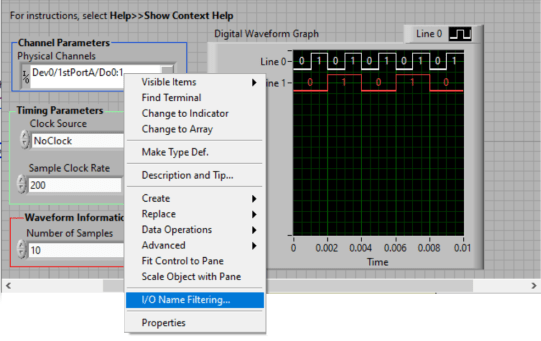
Select IO Name Filtering USB-1208FS-Plus IO Filtering


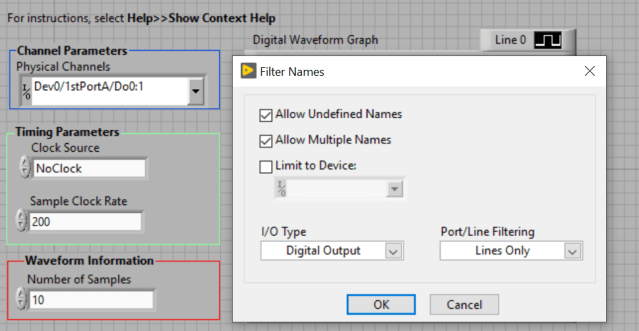
Check the Allow Undefined NameUSB-1208FS-Plus AllowUndefineName


3 ch with not consecutive ch (notice skipped channel)
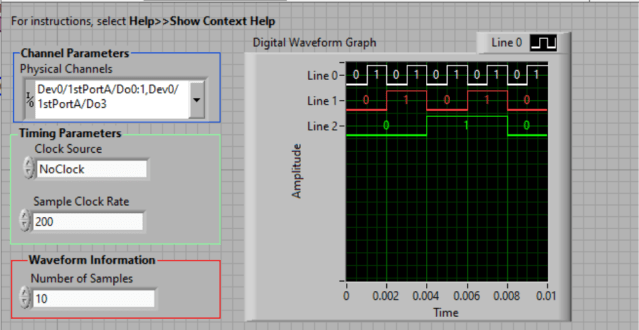
USB-1208-FS-Plus 2Ch and1skipCH 200Hz Digital Out


All Digital lines of PORT A

Note the bit patterns are auto generated by the sample code waveform generator.
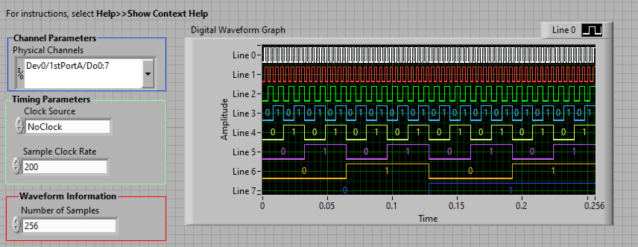
USB-1208-FS-Plus 7Ch 200Hz Digital Out

     
Other Info Information is non sponsored  
  While intent is to inform, use information at your own risk.  
  No cookies use by author  
  If you see an ad Don’t Click it since I did not add ads , click ads at your own risk.  
  Only Links are www.mccdaq.com and www.ni.com  
  Lot of success to your acquisition projects—You can do it.


Posted in Uncategorized | Leave a comment

Requirement come in many forms

Requirement source:

– Documents

– Standards

– Emails

– Yes, even verbal (make sure to document it)

Something must alway connect to the reason you performed an efforts (requirements).

Posted in Test Sector, Uncategorized | Tagged , | Leave a comment

Welcome…

This blog was created to provide topics related to test engineers, test engineering and test equipment departments.

Always double-check the content with other sources.

Because the nature of links, links may not point to the intended link.

This blog/authors does not assume any responsibility for use. Content can change without notice. Ad feeds are automatic and not endorsed in any way.

Posted in Uncategorized | Leave a comment

Software Plan

Consider creating a Software Plan even if you customer does not require one.

It will help you with all the various task which need to be completed and in what order to get you to the final goal (completed software effort).

Include:

What are you input requirement (Documents, Table, Spec, SRS, meeting)?

Breakdown of individual software components:

(GUI, Power Supply Driver, Tests , Sequencer, Printout formats, Database)

Also indicate which task  must be completed before proceeding to next.

All above should have approximate time, who will be doing the task, level of difficulty, comments.

Using a Spreadsheet application ,you can get approximate totals time, percent complete, and status.

Posted in Test Sector | Leave a comment

Remote metering with handheld?

Situation example:
  You hookup a meter to read a voltage or some other parameter and now you want to know the parameter’s value when you move the lever or control that is more than arms length away.
Well Fluke has a solution for you.
THE DISPLAY comes completely OFF the Meter section. How cool is that. Super cool.
None of that now I have to go over here and move this lever and walk back so see the meter display.
Check out  the different parameters. range of display, and accessories at the products detail page then select the Features tab
Fluke is a register trademark of Fluke company.
Posted in Test Sector | Leave a comment

Function/Arbitrary Generator

In need for a USB / LAN  Function / Arbitrary Generator with up to 30MHz(sine/tri/square wave)
 
 
Then Check out Agilent’s 33500 series – 


Agilent is a leader in the Test and Measurement Equipment arena.
 
Posted in Test Sector | Leave a comment

Long duration Test Setups and Test Operators

 When you have a test sequence or Test step which takes time and might give the operator
 the feeling that the test sequence if not running, provide a dialog  with a progress bar(count down or scrolling).
This dialog can be a timed dialog which gets it information from parameters to the calling sequence.
The dialog can be a continuous scrolling progress bars in which the code can be looking at a variable
which is persistent for the duration you need the dialog(FileGlobal.mydialogControlVariable).
This is done in TestStand and LabVIEW using the Sequence Context and TestStand pallete.
TestStand and LabVIEW discussed above  are National Instruments products.
Posted in Test Sector | Leave a comment

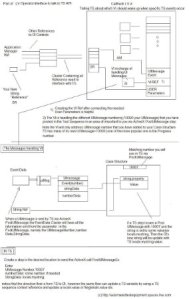
LabVIEW(r) Operator Interface and TestStand(r) UIMessage visual

How do I update a string in the Operator Interface with a value from TestStand?
The key element is UIMessages.
The Operator Interface will handle the UIMessage Event created by a step in TestStand via the PostUIMessageEx activeX.
Below is a visual that will help with the interaction between Operator Interface (which
will start the TestStand API engine(ex Simple OI)) and TestStand sequence.
(larger image file  -SkyDrive public folder)
LabVIEW(r) and TestStand(r) mentioned above are National Instruments products.


Posted in Test Sector | Leave a comment

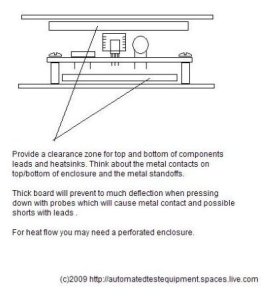
Clearance reminder for components on custom boards.

 
Provide clearance for components from contact with top/bottom of enclosure.
 
 
Posted in Test Sector | Leave a comment

ESD and UUT,Components, and custom boards.

Most electronic components are ESD.
Handle customer boards correctly.
If the device is labeled ESD handling you must use ESD handling (don’t say you are smarter than ESD)
Check you ESD ground Strap.
Most companies have a ground strap tester(you connect your ESD strap and insert the plug into a jack on the ESD tester, then press on the ESD tester will indicate pass or fail via sound or led.
If you are given a UUT or Customer board/component in an ESD enclosure,Treat it as ESD always-when inserting into a non power connector or removing from a non power connector.)
Mosfet component have been damage from improper ESD handling.
Worst is a latent failure(in which is component was damages but not yet evident.) This component has a greater chance of failure during use.
Sometime the ESD strap is connected to a ground jack on the test station (just remember if the ground is on your  ITA(removable fixture)  and its removed you may have broken the ground path).
Its better to be safe then to lose a customer supplied board because due to ESD which delays completion of your project because you can not complete integration.
Once a board is properly connected to it connector which has a proper ground connection and the device is powered you should NOT be using the ESD strap on that board.
Some companies/customers required a log of ESD Strap testing performed (daily,twice daily etc) to verify that the strap is making good ESD contact to your skin.
If you see a mat on a workstation Dont assume it is an “ESD mat” until it is checked out.
If you know you are going to remove an ESD board get ready with your ESD strap and a sealable ESD bag/container.
Verify with your Quality department on any new development on ESD handling and precautions.
Follow your companies procedure and ask before handling.
Posted in Test Sector | Leave a comment