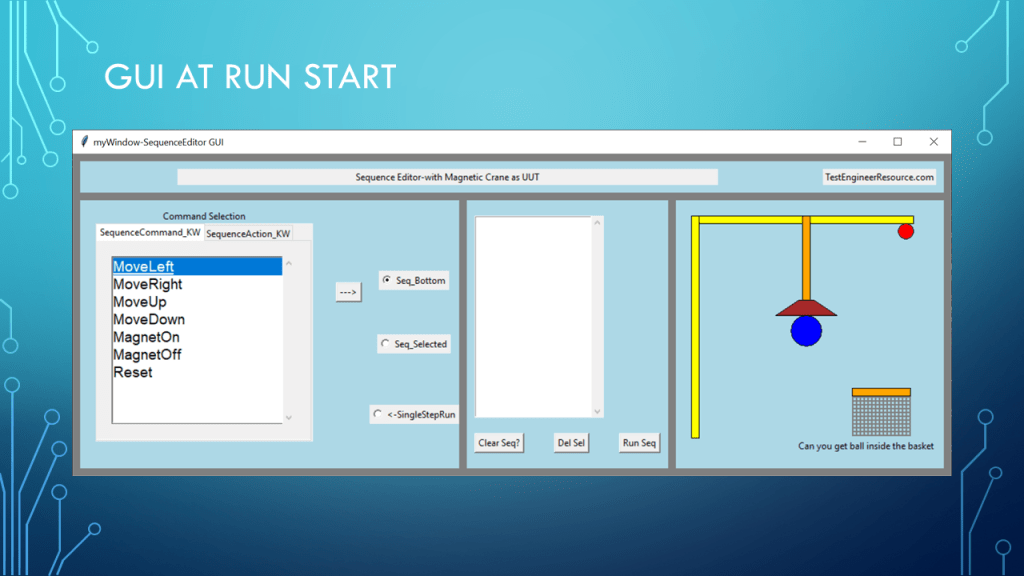
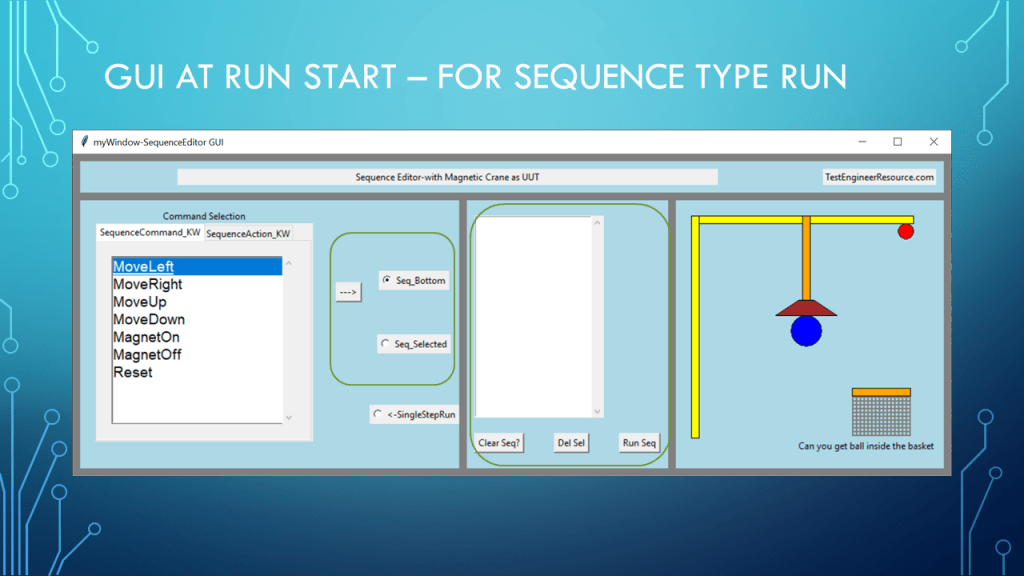
a Python tkinter Sequence Editor example with a simple UUT(Magnetic crane in canvas)
# -*- coding: utf-8 -*-
"""
Created on Thu Apr 20 11:16:31 2023
@author: aleja
App: Sequence Editor (a simplified one level Sequence editor)
Plan: Use a previous app to create the Sequence Editor
1) Command List with tab section
2) A List to hold the Sequence being created
3) Some button to Move command to Sequence List
4) create some simplified UUT(something to control with the sequence list)
Window layout
MainWindow
TopFrame(title and company labels)
Frame1(command list), LeftFrame(Sequence List),TopFrame (simulated UUT to test out sequence)
"""
#from tkinter import *
import tkinter as tk
import tkinter.ttk as ttk
#import math
import time
#import threading
import webbrowser
class MyApp:
def __init__(self,tk):
#GUI setup below
self.myWindow=tk.Tk()
self.myWindow.title("myWindow-SequenceEditor GUI")
w_w=920
w_h=400
self.myWindow.minsize(w_w,w_h)
#self.myWindow.maxsize(w_w,w_h) #fix widow size
# if you ever notice that some frame is sticking to bottom look at these setting
self.myWindow.grid_rowconfigure(1,weight=1) #dont want top row frame to grow(row=0)
self.myWindow.grid_columnconfigure(2,weight=1)
self.myWindow.configure(background='gray')
self.SearchEngine=""
def mainloop(self):
tk.mainloop()
def MakeFrames(self):
#Top
self.TopFrame=tk.Frame(self.myWindow,width=100,height=100,bg='lightblue')
self.TopFrame.grid(row=0, column=0, sticky='NESW', padx=10, pady=10, columnspan=3) #spans 3 cols (3 frames row1)
self.TopFrame.rowconfigure(0,weight=1)
self.TopFrame.columnconfigure(0,weight=1) #the lastcol goes along with rigth side expanding
row1Height=300
self.LeftFrame=tk.Frame(self.myWindow,width=300,height=row1Height,bg='lightblue')
self.LeftFrame.grid(row=1, column=0, sticky='NWS', padx=(10,10), pady=(0,10), columnspan=1,rowspan=3) #padding ALSO takes two arguments tuple
self.LeftFrame.rowconfigure((1,2,3),weight=1)
self.LeftFrame.columnconfigure((0,1,2),weight=1) #the lastcol goes along with rigth side expanding
self.CenterFrame=tk.Frame(self.myWindow,width=200,height=row1Height,bg='lightblue')
self.CenterFrame.grid(row=1, column=1, sticky='NWES', padx=(0,0), pady=(0,10), columnspan=1,rowspan=3) #padding ALSO takes two arguments tuple
self.CenterFrame.rowconfigure((1),weight=1)
self.CenterFrame.columnconfigure((1),weight=1) #the lastcol goes along with rigth side expanding
#some UUT to control with sequence sim frame
self.RightFrame=tk.Frame(self.myWindow,width=350,height=row1Height,bg='lightblue')
self.RightFrame.grid(row=1, column=2, sticky='NEWS', padx=(10,10), pady=(0,10), columnspan=1,rowspan=3) #padding ALSO takes two arguments tuple
self.RightFrame.rowconfigure(1,weight=1)
self.RightFrame.columnconfigure(2,weight=1) #the lastcol goes along with rigth side expanding
def TopFrameWidget(self,strAppTitle="YourAppTitle",strAppCompany="YourCompanyName"):
self.AppTitle=strAppTitle
self.AppCompany=strAppCompany
#TopFrame info
AppTitleLabel=tk.Label(self.TopFrame, width=100, text=self.AppTitle)
CompanyName=tk.Label(self.TopFrame, text=self.AppCompany)
AppTitleLabel.grid(row=0, column=0, padx=10, pady=10, columnspan=2) #span 2 so it does not affect component button
CompanyName.grid(row=0, column=3, padx=10, sticky='E') #Keep
# Notebook add so this is only title and key words.
#in a bigger app this will be loaded from your own file but I need it to be self contain for demo
def Show_Keyword_Selection_ListBox(self):
self.List_Of_Commands=["MoveLeft","MoveRight","MoveUp","MoveDown",\
"MagnetOn","MagnetOff","Reset"] #The List of choices possible to get list from a file but demo is only this file
self.List_Of_Actions=["AlarmLightOn","AlarmLightOff"] #The List of choi
#add your tab list here
self.LOKW_List=[self.List_Of_Commands,self.List_Of_Actions]
self.List_Of_Keyword_Var=tk.StringVar(value=self.List_Of_Commands) # you can put the starting list in StringVar
#Sequence Title
KW_Sel_LBox_Title=tk.Label(self.LeftFrame,text="Command Selection",bg='lightblue')
KW_Sel_LBox_Title.grid(row=0,column=0,padx=10,pady=(10,0),sticky="N")
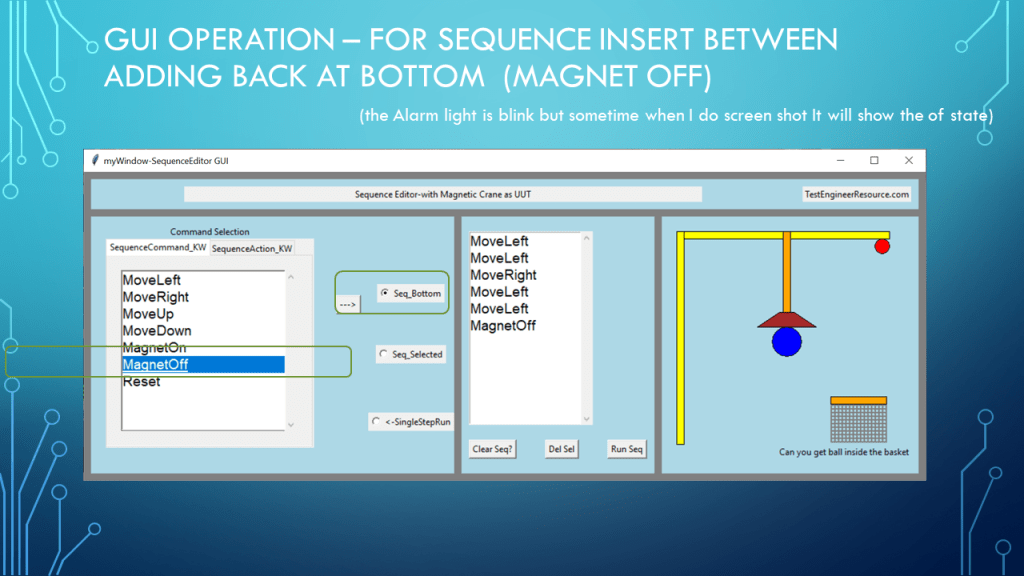
def Show_Move_To_Right_Button(self):
MovToRight_btn=tk.Button(self.LeftFrame,text="--->",command=lambda:self.Add_To_Query())
#print(self.KW_Sel_LBox.curselection())
MovToRight_btn.grid(row=1,column=1,padx=10,pady=10)
#self.KW_Sel_LBox.focus()
#self.KW_Sel_LBox.select_set(0,0)
def Seq_Clicked(self,event=None):
print(str(event))
print("Seq_Clicked")
#Test if Empty
SeqListIndex=self.Seq_Lb.curselection()
if (SeqListIndex):
print("something is blue")
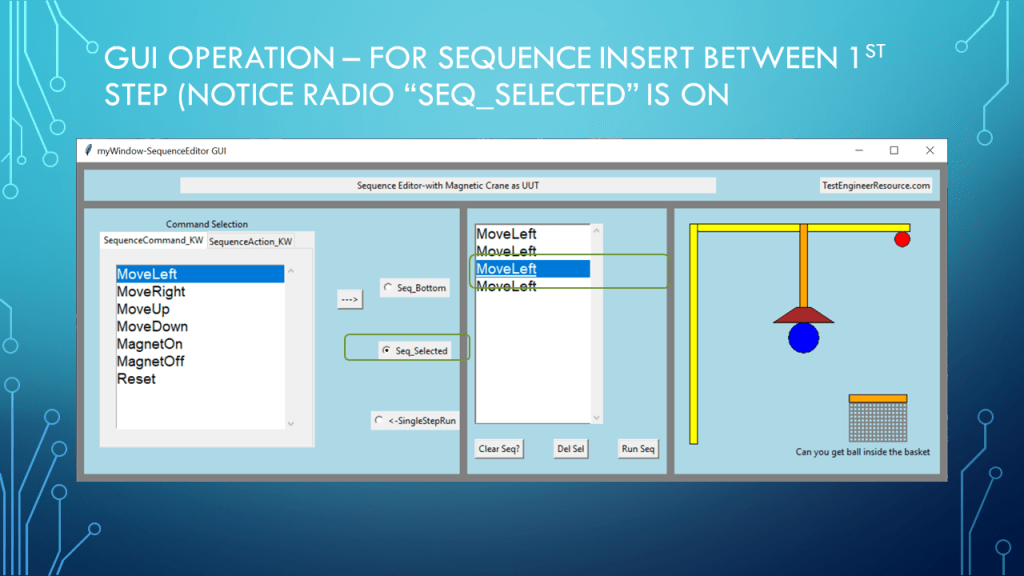
self.action_mode.set("Seq_Selected")
else:
self.action_mode.set("Seq_Bottom")
def Show_Sequence(self):
self.Seq_Lb=tk.Listbox(self.CenterFrame,width=15,height=10,font=("Arial",14,''))
self.Seq_Lb.bind("<<ListboxSelect>>",self.Seq_Clicked)
self.Seq_Lb.grid(row=0,column=0,columnspan=2,rowspan=3,sticky='NWS',padx=10,pady=(20,10))
self.Seq_Lb.columnconfigure(0,weight=1)
self.Seq_Lb.rowconfigure(0,weight=1)
#attach a Scrollbar to txt1
vscroll=tk.Scrollbar(self.CenterFrame,orient='vertical',command=self.Seq_Lb.yview)
self.Seq_Lb['yscroll']=vscroll.set
vscroll.grid(row=0,column=0,columnspan=2,rowspan=3,sticky='NSE',padx=10,pady=(20,10))
# #move to seq list button
# def Show_Move_Down_Right_Button(self):
# MovTo_Down_btn=tk.Button(self.LeftFrame,text="|\n|\nV",command=lambda:self.Add_Q_To_Query())
# MovTo_Down_btn.grid(row=1,column=2,padx=10,pady=10)
# self.KW_Sel_LBox.focus()
# self.KW_Sel_LBox.select_set(0)
def Add_To_Query(self):
tab_index=self.tab_Holder.index('current') # a way to get the index of tab selected
print(self.tab_Holder.tab(self.tab_list[tab_index],"text")) # a way to get selected tab name
#print(self.scrollv_text_list[tab_index].curselection())
self.KW_Sel_LBox=self.scrollv_text_list[tab_index]
IndexsList=list(self.KW_Sel_LBox.curselection()) #tuple to list (incase LBox is multiselect future)
#print(IndexsList)
if IndexsList: #only if something in list
for Index in IndexsList: #for now only select one item at a time
strText=self.KW_Sel_LBox.get(Index)
#NO Delete self.KW_Sel_LBox.delete(Index)
#self.KW_Sel_LBox.selection_clear(0,'end') #way to clear all(no blue)
#self.KW_Sel_LBox.selection_set(0) #set to top of list
#self.strText_KW=self.strText_KW+strText
print(self.action_mode.get())
if (self.action_mode.get()!="SingleStepRun"):
Seq_IndexList=list(self.Seq_Lb.curselection()) #tuple to list only one since multiselect not on
if (Seq_IndexList): #someone select in seq list
for SeqIndex in Seq_IndexList:
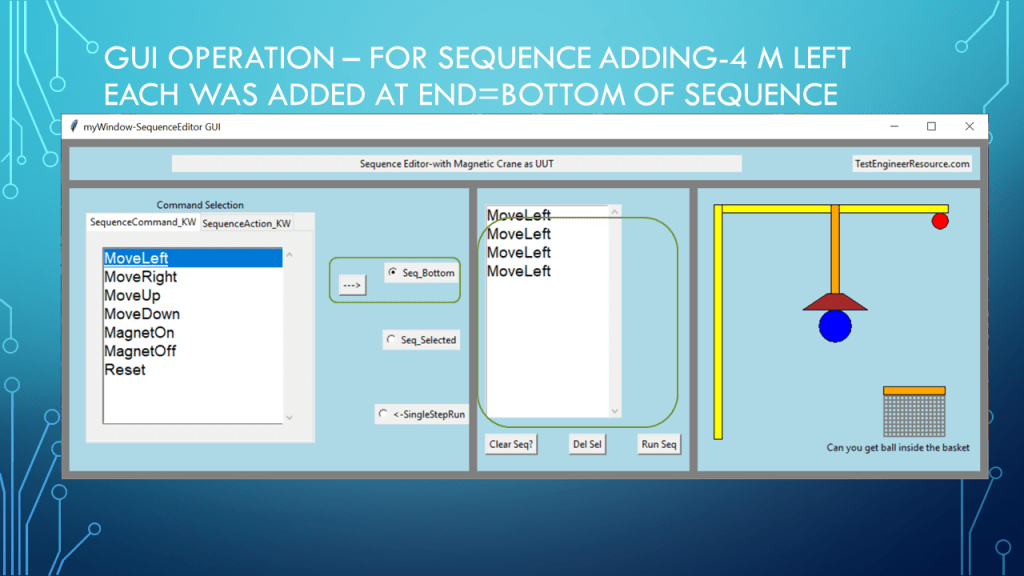
self.Seq_Lb.insert(SeqIndex,strText)
else:
self.Seq_Lb.insert('end',strText)
self.Seq_Lb.see('end') #move scroll to end
else:
self.SingleStepRunCmd=strText
print(self.SingleStepRunCmd)
self.Run_Seq(True)
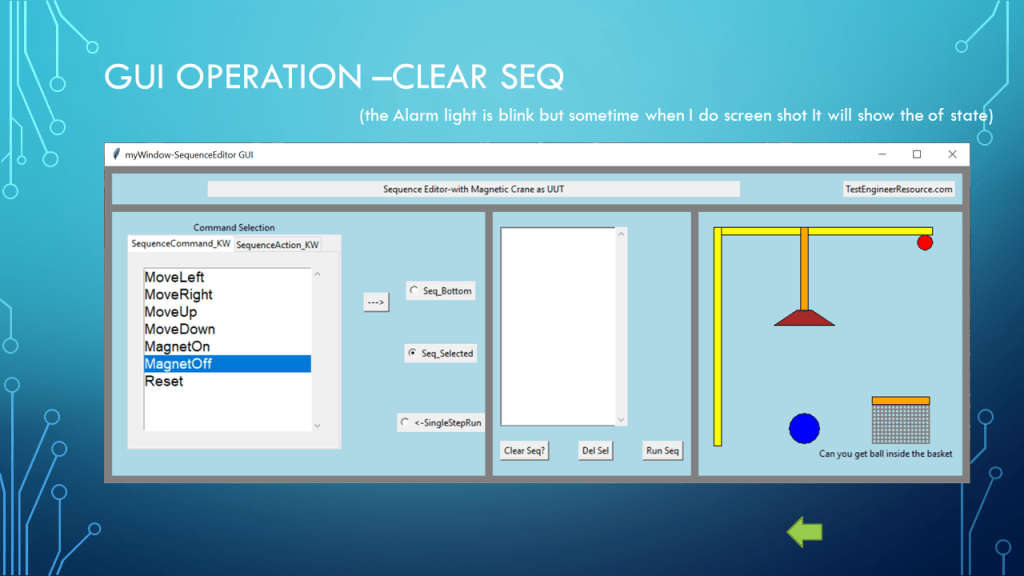
def Show_Clear_Button(self):
self.Clr_btn=tk.Button(self.CenterFrame,text="Clear Seq?",command=lambda:self.ClrQuery())
self.Clr_btn.grid(row=3,column=0,padx=10,pady=(10,20),sticky="N")
self.Clr_btn.rowconfigure(3,weight=1)
def ClrQuery(self):
print(self.myWindow.winfo_width(),self.myWindow.winfo_height())
self.strText=""
self.strText_KW=""
self.Seq_Lb.focus()
self.Seq_Lb.delete(0,'end')
self.Seq_Lb.selection_clear(0,'end')
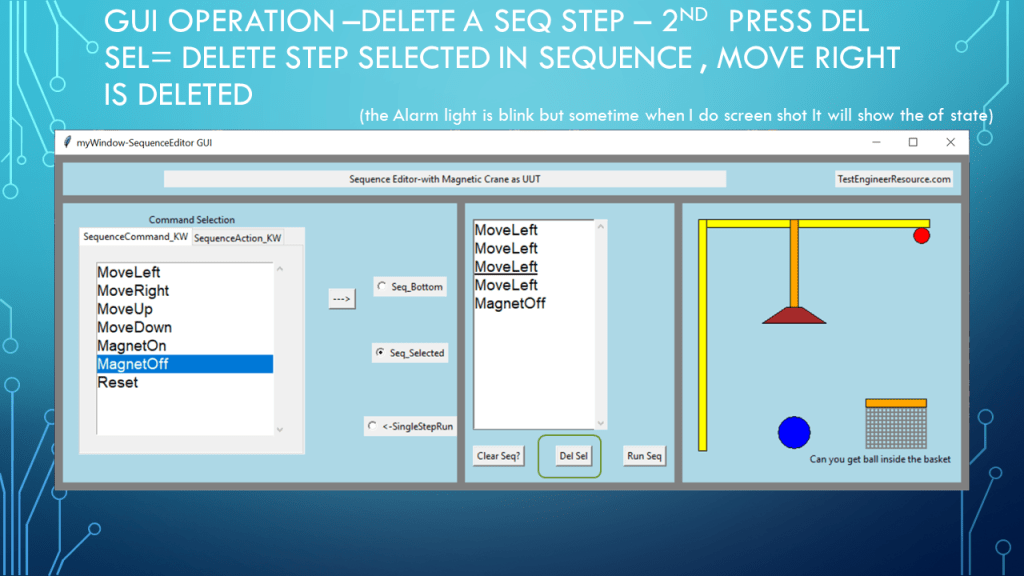
def Delete_Selected_SeqList(self):
IndexsList=list(self.Seq_Lb.curselection()) #tuple to list (incase LBox is multiselect future)
#print(IndexsList)
if IndexsList: #only if something in list selected
for Index in IndexsList: #for now only select one item at a time
self.Seq_Lb.delete(Index)
def Show_Del_Button(self):
self.Del_btn=tk.Button(self.CenterFrame,text="Del Sel",command=lambda:self.Delete_Selected_SeqList())
self.Del_btn.grid(row=3,column=1,padx=10,pady=(10,20),sticky="N")
self.Del_btn.rowconfigure(3,weight=1)
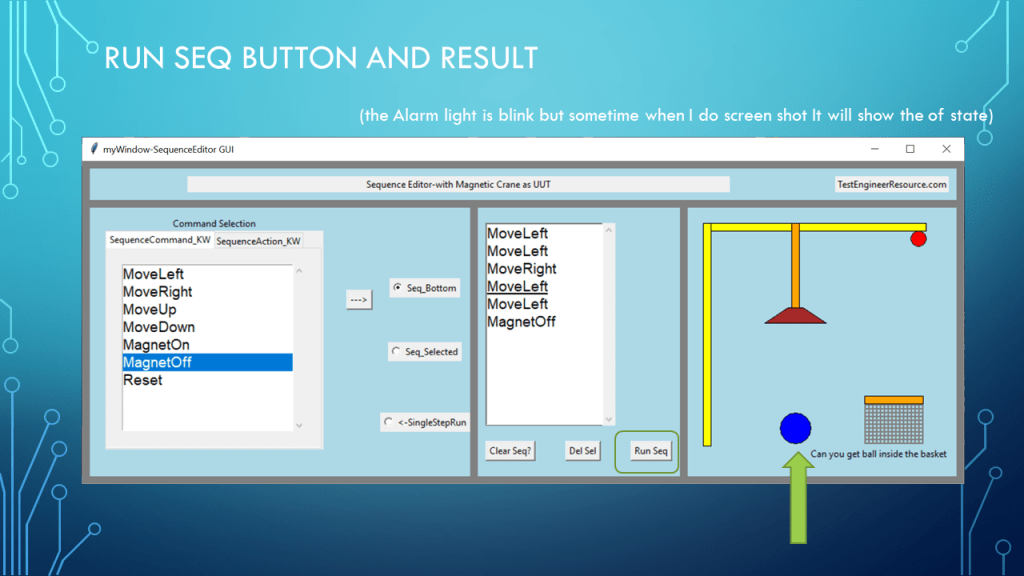
def Show_RunSeq_Button(self):
self.Clr_btn=tk.Button(self.CenterFrame,text="Run Seq",command=lambda:self.Run_Seq())
self.Clr_btn.grid(row=3,column=2,padx=10,pady=(10,20),sticky="N")
self.Clr_btn.rowconfigure(3,weight=1)
def Run_Seq(self,SingleStepMode=False):
self.Seq_Lb.focus()
print (self.Seq_Lb.get(0,"end"))
#self.Seq_List=list(self.Seq_Lb.get(0,"end"))
if(SingleStepMode==False):
self.Seq_List=list(self.Seq_Lb.get(0,"end"))
else:
self.Seq_List=[]
self.Seq_List.append(self.SingleStepRunCmd)
for i,item in enumerate(self.Seq_List):
self.Seq_Lb.select_set(i)
if (item=="MoveLeft" and self.Stop_Move_Left==0):
if(self.Magnet_Field==1 and self.Magnet_Ball==1):self.Move_Left()
print(self.Magnet_Field)
self.Move_Magnet_Left()
self.Move_Chain_Left()
if(self.Magnet_Field==1):
self.Magnet_On()
if (item=="MoveRight" and self.Stop_Move_Right==0):
if(self.Magnet_Field==1 and self.Magnet_Ball==1):self.Move_Right()
self.Move_Magnet_Right()
self.Move_Chain_Right()
if(self.Magnet_Field==1):
self.Magnet_On()
if (item=="MoveUp"):
self.Stop_Move_Down=0
self.Stop_Magnet_Down=0
if(self.Magnet_Field==1 and self.Magnet_Ball==1 and self.Stop_Move_Up==0):self.Move_Up()
if(self.Stop_Magnet_Up==0):
self.Move_Magnet_Up()
self.Move_Chain_Up()
if(self.Magnet_Field==1):
self.Magnet_On()
if (item=="MoveDown"):
self.Stop_Move_Up=0
self.Stop_Magnet_Up=0
if(self.Magnet_Field==1 and self.Magnet_Ball==1 and self.Stop_Move_Down==0):self.Move_Down()
if(self.Stop_Magnet_Down==0):
self.Move_Magnet_Down()
self.Move_Chain_Down()
if(self.Magnet_Field==1):
self.Magnet_On()
if (item== "Reset"): self.Move_Center()
if (item=="MagnetOn"): self.Magnet_On()
if (item=="MagnetOff"): self.Magnet_Off()
if (item=="AlarmLightOn"):self.Alarm_Light(1)
if (item=="AlarmLightOff"):self.Alarm_Light(0)
self.myWindow.update()
self.Seq_Lb.select_clear(i)
time.sleep(0.05) #simple for now
print(i,item)
#used by Show_Tabs via notebook event
def Tab_Changed_Event(self,event=None):
print("Tab changed")
tab_index=self.tab_Holder.index('current') # a way to get the index of tab selected
self.KW_Sel_LBox=self.scrollv_text_list[tab_index]
print(self.tab_Holder.tab(self.tab_Holder.select(),"text"))
self.scrollv_text_list[tab_index].focus()
self.scrollv_text_list[tab_index].selection_clear(0,'end')
self.scrollv_text_list[tab_index].select_set(0)
def Show_Tabs(self):
self.tab_Holder=ttk.Notebook(self.LeftFrame,style='Custom.TNotebook',width=280,height=250)
self.tab_Holder.grid(row=0,column=0,sticky='NS',columnspan=1,rowspan=3,padx=20,pady=30)
self.tab_Holder.rowconfigure(1,weight=1)
self.tab_Holder.columnconfigure(1,weight=1)
#need to use newer way ,this is still old way dont need tab name just order in a List
tab1=tk.Frame(self.tab_Holder) #tab obj to notebook but not added yet
tab1.columnconfigure(0,weight=1) #lessons learn You must tell tab object that thing inside can auto grow
tab1.rowconfigure(0,weight=1)
tab2=tk.Frame(self.tab_Holder)
tab2.columnconfigure(0,weight=1)
tab2.rowconfigure(0,weight=1)
self.tab_list=[tab1,tab2] # for adding scroll text obj in each tab
#self,tab_Holder.bind("<<NotebookTabChanged>>",tab_event_handler)
self.tab_Holder.add(tab1,text="SequenceCommand_KW")
self.tab_Holder.add(tab2,text="SequenceAction_KW")
#self.tab_Holder.add(tab3,text="Other_KW")
self.scrollv_text_list=[]
for i,tab in enumerate(self.tab_list): # enumerate Leason Learn cool
txt1=tk.Listbox(tab,width=30,height=20,font=("Arial",14,''),exportselection =False)
txt1.grid(row=0,column=0,columnspan=2,rowspan=3,sticky='NWES',padx=20,pady=(20,20))
txt1.bind("<<ListboxSelect>>",self.Selected_Cmd)
txt1.columnconfigure(0,weight=1)
txt1.rowconfigure(0,weight=1)
#attach a Scrollbar to txt1
vscroll=tk.Scrollbar(tab,orient='vertical',command=txt1.yview)
txt1['yscroll']=vscroll.set
vscroll.grid(row=0,column=1,sticky='NSE',padx=20,pady=20)
self.scrollv_text_list.append(txt1)
for KW in self.LOKW_List[i]:
txt1.insert('end',KW)
self.tab_Holder.select(self.tab_list[0]) #default tab of notebook
self.scrollv_text_list[0].focus()
self.scrollv_text_list[0].select_set(0)
self.tab_Holder.bind("<<NotebookTabChanged>>",self.Tab_Changed_Event)
def Selected_Cmd(self,event=None):
print("Command Selected")
IndexsList=list(self.KW_Sel_LBox.curselection())
if(IndexsList): #nothing selected dont do anything
str_command=(self.KW_Sel_LBox.get(IndexsList))
print(str_command)
#List that required one arg
OneArg_List=["MoveLeft","MoveRight","MoveUp","MoveDown"] #future as possible arg tab
#if(str_command in OneArg_List):
# print("required amount arg")
def Show_SimUUT(self):
UUT_Width=300
UUT_Height=300
Dot_Padding=10
Center_Dot_x=UUT_Width/2+Dot_Padding
Center_Dot_y=UUT_Height/2+Dot_Padding
Center_Dot_radius=20
self.Floor_y=UUT_Height-10
self.canv1=tk.Canvas(self.RightFrame,width=UUT_Width+30, height=UUT_Height+30, bg='lightblue', bd=0, highlightthickness=0)
self.canv1.grid(row=0, column=0, columnspan=1,padx=10,pady=10,sticky="NSEW")
self.Ball=self.canv1.create_oval(Center_Dot_x-Center_Dot_radius,Center_Dot_y-Center_Dot_radius,\
Center_Dot_x+Center_Dot_radius,Center_Dot_y+Center_Dot_radius,fill='blue')
self.Ball_Reset=self.canv1.coords(self.Ball)
#Magnet
self.Magnet_Field=0 #0=off 1=on
self.Stop_Move_Left=0
self.Stop_Move_Right=0
self.Stop_Move_Up=0
self.Stop_Move_Down=0
self.Stop_Magnet_Down=0
self.Stop_Magnet_Up=0
self.Magnet_Field=1
self.Magnet_Width=50
self.Magnet_Height=20
self.Magnet_Top_short=30
self.Magnet_X1=UUT_Width/2-Dot_Padding-Center_Dot_radius
self.Magnet_Y1=UUT_Height/2-self.Magnet_Height-Center_Dot_radius/2
self.Magnet_Ploy_List=[self.Magnet_X1+self.Magnet_Top_short,self.Magnet_Y1,\
self.Magnet_X1+self.Magnet_Width,self.Magnet_Y1,\
self.Magnet_X1+self.Magnet_Width+self.Magnet_Top_short,self.Magnet_Y1+self.Magnet_Height,\
self.Magnet_X1,self.Magnet_Y1+self.Magnet_Height]
self.Magnet=self.canv1.create_polygon(self.Magnet_Ploy_List, fill="brown",outline="black")
self.Magnet_Reset=self.canv1.coords(self.Magnet)
#Top part of beam
self.canv1.create_rectangle(10,10,300,20, fill='yellow',outline='black')
#Left side vert beam
self.canv1.create_rectangle(10,10,20,300, fill='yellow',outline='black')
#chain
self.Chain_Thick=10
self.Chain=self.canv1.create_rectangle(150-self.Chain_Thick/2+10,10,150+self.Chain_Thick/2+10,120,fill='orange',outline='black')
self.Chain_Reset=self.canv1.coords(self.Chain)
def Move_Left(self):
#almost sure thare a better way to enum this
x1=0
y1=1
x2=2
y2=3
self.Ball_coords=self.canv1.coords(self.Ball)
print(self.Ball_coords)
self.Ball_coords[x1]=self.Ball_coords[x1]-10
self.Ball_coords[x2]=self.Ball_coords[x2]-10
self.canv1.coords(self.Ball,self.Ball_coords)
#self.canv1.coords(self.Ball, 10,10 ,20,20)
def Move_Right(self):
#almost sure thare a better way to enum this
x1=0
y1=1
x2=2
y2=3
self.Ball_coords=self.canv1.coords(self.Ball)
print(self.Ball_coords)
self.Ball_coords[x1]=self.Ball_coords[x1]+10
self.Ball_coords[x2]=self.Ball_coords[x2]+10
self.canv1.coords(self.Ball,self.Ball_coords)
#self.canv1.coords(self.Ball, 10,10 ,20,20)
def Move_Up(self):
#almost sure thare a better way to enum this
x1=0
y1=1
x2=2
y2=3
self.Ball_coords=self.canv1.coords(self.Ball)
print(self.Ball_coords)
self.Ball_coords[y1]=self.Ball_coords[y1]-10 #remember up is down in cavs coord
self.Ball_coords[y2]=self.Ball_coords[y2]-10
self.canv1.coords(self.Ball,self.Ball_coords)
#self.canv1.coords(self.Ball, 10,10 ,20,20)
def Move_Down(self):
#almost sure thare a better way to enum this
x1=0
y1=1
x2=2
y2=3
self.Ball_coords=self.canv1.coords(self.Ball)
print(self.Ball_coords)
self.Ball_coords[y1]=self.Ball_coords[y1]+10
self.Ball_coords[y2]=self.Ball_coords[y2]+10
self.canv1.coords(self.Ball,self.Ball_coords)
#self.canv1.coords(self.Ball, 10,10 ,20,20)
def Move_Center(self):
#almost sure thare a better way to enum this
x1=0
y1=1
x2=2
y2=3
self.canv1.coords(self.Ball, self.Ball_Reset)
self.canv1.coords(self.Magnet,self.Magnet_Reset)
self.canv1.coords(self.Chain,self.Chain_Reset)
#Magnet
self.Magnet_Field=0 #0=off 1=on
self.Stop_Move_Left=0
self.Stop_Move_Right=0
self.Stop_Move_Up=0
self.Stop_Move_Down=0
self.Stop_Magnet_Down=0
self.Stop_Magnet_Up=0
self.Magnet_Field=1
self.Magnet_Ball=1
self.Light=0
def Move_Magnet_Left(self):
self.Magnet_coords=(self.canv1.coords(self.Magnet))
Xs=[0,2,4,6]
Ys=[1,3,5,7]
if(self.Stop_Move_Left==0):
for x in Xs:
self.Magnet_coords[x]-=10
if(self.Magnet_coords[x]<=20):self.Stop_Move_Left=1
self.canv1.coords(self.Magnet,self.Magnet_coords)
print("Magnet Position",self.Magnet_coords)
self.Stop_Move_Right=0
def Move_Magnet_Right(self):
self.Magnet_coords=(self.canv1.coords(self.Magnet))
Xs=[0,2,4,6]
Ys=[1,3,5,7]
if(self.Stop_Move_Right==0):
for x in Xs:
self.Magnet_coords[x]+=10
if(self.Magnet_coords[x]>=300):self.Stop_Move_Right=1
self.canv1.coords(self.Magnet,self.Magnet_coords)
print("Magnet Position",self.Magnet_coords)
self.Stop_Move_Left=0
def Move_Magnet_Up(self):
self.Magnet_coords=(self.canv1.coords(self.Magnet))
Xs=[0,2,4,6]
Ys=[1,3,5,7]
for y in Ys:
self.Magnet_coords[y]-=10
if(self.Magnet_coords[y]<=30):
self.Stop_Move_Up=1
self.Stop_Magnet_Up=1
self.canv1.coords(self.Magnet,self.Magnet_coords)
self.Stop_Magnet_Down=0
def Move_Magnet_Down(self):
self.Magnet_coords=(self.canv1.coords(self.Magnet))
Xs=[0,2,4,6]
Ys=[1,3,5,7]
for y in Ys:
self.Magnet_coords[y]+=10
if(self.Magnet_coords[y]>=240):
self.Stop_Magnet_Down=1
self.Stop_Move_Down=1
self.canv1.coords(self.Magnet,self.Magnet_coords)
self.Stop_Magnet_Up=0
def Move_Chain_Left(self):
x1=0
y1=1
x2=2
y2=3
self.Chain_coords=self.canv1.coords(self.Chain)
self.Chain_coords[x1]-=10
self.Chain_coords[x2]-=10
self.canv1.coords(self.Chain,self.Chain_coords)
def Move_Chain_Right(self):
x1=0
y1=1
x2=2
y2=3
self.Chain_coords=self.canv1.coords(self.Chain)
self.Chain_coords[x1]+=10
self.Chain_coords[x2]+=10
self.canv1.coords(self.Chain,self.Chain_coords)
def Move_Chain_Up(self,amount=10):
x1=0
y1=1
x2=2
y2=3
self.Chain_coords=self.canv1.coords(self.Chain)
self.Chain_coords[y2]-=amount
self.canv1.coords(self.Chain,self.Chain_coords)
def Move_Chain_Down(self,amount=10):
x1=0
y1=1
x2=2
y2=3
self.Chain_coords=self.canv1.coords(self.Chain)
self.Chain_coords[y2]+=amount
self.canv1.coords(self.Chain,self.Chain_coords)
def Magnet_On(self):
self.Magnet_Field=1
#self.Magnet_Ball=0 #not connected yet
print("Magnet file is :",self.Magnet_Field)
x1=0
y1=1
x2=2
y2=3
self.Magnet_coords=(self.canv1.coords(self.Magnet))
Xs=[0,2,4,6]
Ys=[1,3,5,7]
self.Ball_coords=self.canv1.coords(self.Ball)
print("ball",self.Ball_coords)
print("Mag",self.Magnet_coords)
i=1
list_of_coords_moves=[]
Magnet_coords_Ys=[]
Magnet_coords_Xs=[]
#need to see if ball is near magnet and near center
self.Magnet_Field_Power=30
for item in Ys:
Magnet_coords_Ys.append(self.Magnet_coords[item])
for item in Xs:
Magnet_coords_Xs.append(self.Magnet_coords[item])
#check if ball is near the magnet and near center
while (any(y < self.Ball_coords[y1]-20 for y in Magnet_coords_Ys)
and any((self.Ball_coords[y1]-y)<self.Magnet_Field_Power for y in Magnet_coords_Ys)
and ((self.Ball_coords[x2]+self.Ball_coords[x1])/2-(max(Magnet_coords_Xs)+min(Magnet_coords_Xs))/2 < 5)):#must also be close
self.Magnet_Ball=1
print("Magnet_ has the ball",self.Magnet_Ball)
if(any(y < self.Ball_coords[y1]-20 for y in Magnet_coords_Ys)): #slow down
i=i-1.5 #some accel
else:
i=i-1.5
print(i)
self.Ball_coords[y1]=self.Ball_coords[y1]+i
self.Ball_coords[y2]=self.Ball_coords[y2]+i
self.canv1.coords(self.Ball,self.Ball_coords)
#print(self.Ball_coords)
self.Ball_coords=self.canv1.coords(self.Ball)
list_of_coords_moves.append(self.Ball_coords)
time.sleep(0.1)
self.myWindow.update()
if(self.Magnet_Ball==1):
self.Magnet_coords=(self.canv1.coords(self.Magnet))
self.Ball_coords[y1]=self.Magnet_coords[7]
self.Ball_coords[y2]=self.Magnet_coords[7]+40
self.canv1.coords(self.Ball,self.Ball_coords) #sometime coarse and fine fix
print(*list_of_coords_moves,sep="\n") #this way printed correctly
#self.canv1.coords(self.Ball, 10,10 ,20,20)
def Magnet_Off(self):
self.Magnet_Field=0
self.Magnet_Ball=0
print("Magnet file is :",self.Magnet_Field)
#almost sure thare a better way to enum this
x1=0
y1=1
x2=2
y2=3
self.Ball_coords=self.canv1.coords(self.Ball)
print(self.Ball_coords)
i=1
list_of_coords_moves=[]
while (self.Ball_coords[y2]<self.Floor_y):
if(self.Ball_coords[y2]<(self.Floor_y-100)):
i=i+1.5 #some accel
else:
i=i+0.5
print(i)
self.Ball_coords[y1]=self.Ball_coords[y1]+i
self.Ball_coords[y2]=self.Ball_coords[y2]+i
self.canv1.coords(self.Ball,self.Ball_coords)
#print(self.Ball_coords)
self.Ball_coords=self.canv1.coords(self.Ball)
list_of_coords_moves.append(self.Ball_coords)
time.sleep(0.1)
self.myWindow.update()
print(*list_of_coords_moves,sep="\n") #this way printed correctly
#self.canv1.coords(self.Ball, 10,10 ,20,20)
def Alarm_Light(self,AL_State):
self.Light=0
self.AL_State=AL_State
if(self.AL_State==1 and self.Already_Blinking==0):
print("Alarm Light On")
self.canv1.itemconfigure(self.AlarmLight, fill="red")
self.Alarm_Light_Blink()
if(self.AL_State==0):
print("Alarm Light Off")
self.canv1.itemconfigure(self.AlarmLight, fill="black")
def Alarm_Light_Blink(self): # must prevent calling two or you will get double up window.after
if(self.AL_State==1):
self.Already_Blinking=1
if (self.Light==1):
self.canv1.itemconfigure(self.AlarmLight, fill="red")
self.Light=0
else:
self.canv1.itemconfigure(self.AlarmLight, fill="black")
self.Light=1
self.myWindow.after(1000,self.Alarm_Light_Blink)
else:
self.Already_Blinking=0
def Show_Alarm_Light(self):
AL_Dia=20
AL_Loc_X=280
AL_Loc_Y=20
self.AlarmLight=self.canv1.create_oval(AL_Loc_X,AL_Loc_Y,AL_Loc_X+AL_Dia,AL_Loc_Y+AL_Dia,fill="black",outline="black")
self.Already_Blinking=0
def Seq_Macro(self): #future
Macro_Seq1=('Reset', 'AlarmLightOn', 'MagnetOff', 'MoveLeft', 'MoveLeft', 'MoveLeft', 'MoveLeft',\
'MoveLeft', 'MoveDown', 'MoveDown', 'MoveDown', 'MoveDown', 'MoveDown', 'MoveLeft',\
'MoveLeft', 'MoveDown', 'MoveDown', 'MoveDown', 'MoveDown', 'MoveRight', 'MoveRight',\
'MoveRight', 'MoveRight', 'MoveRight', 'MoveRight', 'MoveRight', 'MagnetOn')
def Mode_Change(self):
strM=self.action_mode.get()
if(strM=="Seq_Bottom"):
self.Seq_Lb.selection_clear(0,'end')
print(strM)
if(strM=="Seq_Selected"):
print(strM)
if(strM=="SingleStepRun"):
self.Seq_Lb.selection_clear(0,'end')
print(strM)
print("inside Mode_Change")
def Show_Modes(self):
Modes=["Seq_Bottom","Seq_Selected","SingleStepRun"]
Modes=[
("Seq_Bottom","Seq_Bottom"),
("Seq_Selected","Seq_Selected"),
("<-SingleStepRun","SingleStepRun")]
self.action_mode=tk.StringVar()
for i,mode in enumerate(Modes):
print(i,mode)
m_rb=tk.Radiobutton(self.LeftFrame,text=mode[0],variable=self.action_mode,value=mode[1],command=lambda:self.Mode_Change()) #odd RADIOBUTTON show on tk but Radiobutton it should be
m_rb.grid(row=i,column=2,rowspan=2)
self.action_mode.set("Seq_Bottom")
class Basket():
def __init__(self,mainGUI=MyApp,x=0,y=0): # if i did not add =MyApp then mainGUI.canv1 will help me find canv1
super().__init__() #dont really know what to do with this yet (in learning curve)
self.mainGUI=mainGUI #(yes i feel i am not doing it corretly or easier, had to do this why so other method of this class could see the arg mainGUI , maybe this is the way
self.Basket_X1=x
self.Basket_Y1=y
self.Basket_W=76
self.Basket_H=50
self.Basket_Rim_H=10
self.canvas=mainGUI.canv1 #feeling i should not do it this way (now this class need to know about other class canvas what if multiple canvas)
self.Basket_coords=[self.Basket_X1,self.Basket_Y1,self.Basket_X1+self.Basket_W,self.Basket_Y1+self.Basket_Rim_H]
self.canvas.create_rectangle(self.Basket_coords,fill="orange")
self.BK_Under_RimY1=self.Basket_Y1+self.Basket_Rim_H
#wire mesh of basket
self.Basket_Border=1
#verticle mesh |
for Bx in range(self.Basket_X1+self.Basket_Border,self.Basket_X1+self.Basket_Border+self.Basket_W+self.Basket_Border+1,5):
self.canvas.create_line(Bx,self.BK_Under_RimY1+self.Basket_Border,Bx,self.BK_Under_RimY1+self.Basket_Border+self.Basket_H+2,fill='gray',width=2)
#horizontal mesh -
for By in range(self.Basket_Y1+2,self.Basket_Y1+self.Basket_H+3,5):
self.canvas.create_line(self.Basket_X1+1,By+self.Basket_Rim_H,self.Basket_X1-1+self.Basket_W,By+self.Basket_Rim_H,fill='gray',width=2)
#a place to put basket text in canv1 which is canvas in this class
self.Ball_In_Basket=0
self.canvas_Text=self.canvas.create_text(150,310,text="",anchor="w",justify='left')
def Monitor_Basket_For_Ball_Drop(self):
#did not know how to use the super so it know about mainGUI in the init arg (sorry) so i had to create self.mainGUI
x1=0
y1=1
x2=2
y2=3
self.Ball_coords=self.canvas.coords(self.mainGUI.Ball)
print("HELLO")#Main GUI ball
print("ball in basket=",self.Ball_In_Basket)
print(self.Ball_coords)
if (
self.Ball_coords[x1]>self.Basket_X1 and self.mainGUI.Ball_coords[x2]<self.Basket_X1+self.Basket_W
and self.Ball_coords[y2]>self.Basket_Y1 and self.mainGUI.Magnet_Ball==0):
print("Ball inside basket,Excellent")
self.canvas.itemconfigure(self.canvas_Text, text= "Ball inside basket. Excellent")
self.Ball_In_Basket=1
else:
self.Ball_In_Basket=0
if (self.Ball_In_Basket==0):
#print("no ball in basket yet")
self.canvas.itemconfigure(self.canvas_Text, text= "Can you get ball """"inside"""" the basket")
self.mainGUI.myWindow.after(1000,self.Monitor_Basket_For_Ball_Drop)
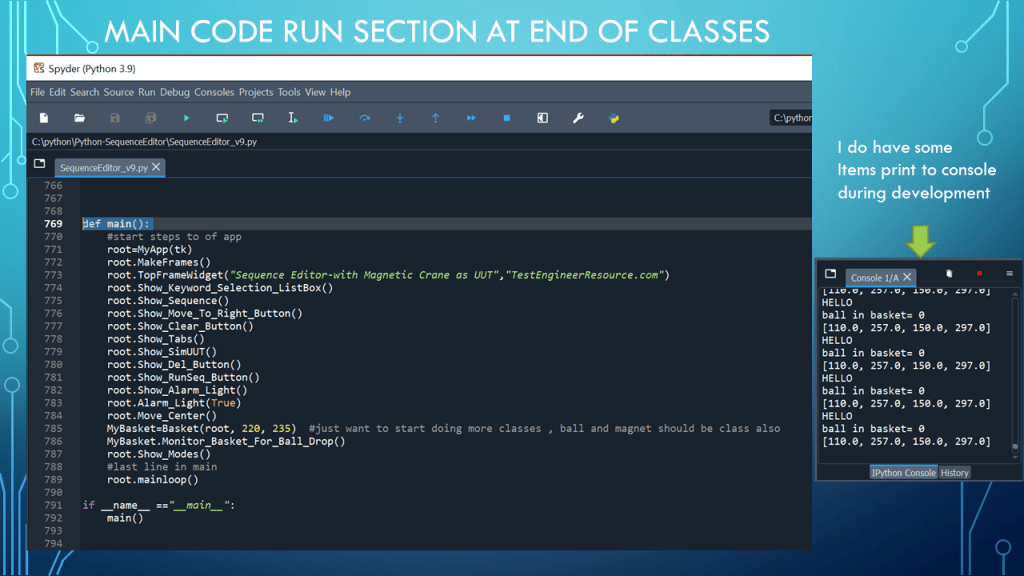
def main():
#start steps to of app
root=MyApp(tk)
root.MakeFrames()
root.TopFrameWidget("Sequence Editor-with Magnetic Crane as UUT","TestEngineerResource.com")
root.Show_Keyword_Selection_ListBox()
root.Show_Sequence()
root.Show_Move_To_Right_Button()
root.Show_Clear_Button()
root.Show_Tabs()
root.Show_SimUUT()
root.Show_Del_Button()
root.Show_RunSeq_Button()
root.Show_Alarm_Light()
root.Alarm_Light(True)
root.Move_Center()
MyBasket=Basket(root, 220, 235) #just want to start doing more classes , ball and magnet should be class also
MyBasket.Monitor_Basket_For_Ball_Drop()
root.Show_Modes()
#last line in main
root.mainloop()
if __name__ =="__main__":
main()







































 Test Engineers Resource