Example GUI with Python3 and Tkinter
using Place and Pack (grid will be another post)
Widgets used
- window
- canvas
- label
- button
- frame
- circle oval
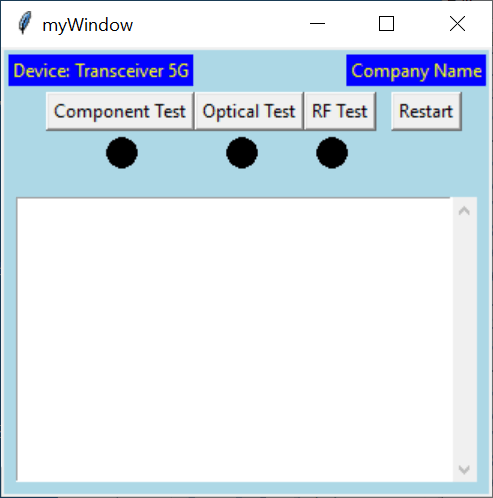
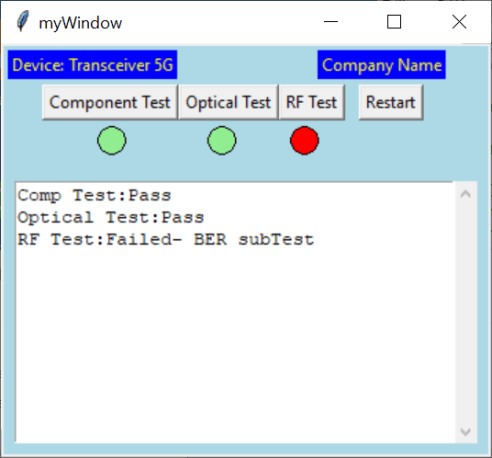
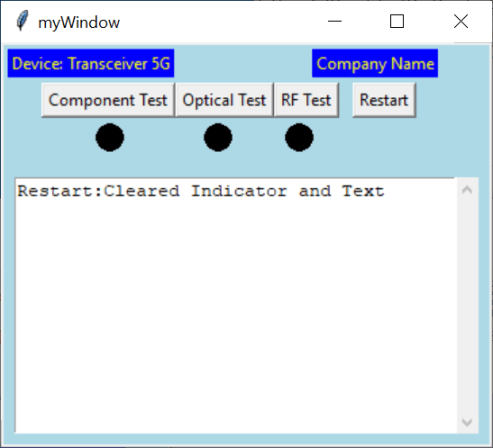
# -*- coding: utf-8 -*-
"""
Created on Thu Nov 28 19:30:21 2019

@author: aleja
#Focus is on tkinter as GUI only, using place,and pack method (will show grid in another post)
Helpful Reference used:
    https://www.tutorialspoint.com/python3/tk_button.htm
    https://bytes.com/topic/python/answers/932249-tkinter-button-commands-called-only-startup
    https://stackoverflow.com/questions/41976546/scrollbar-in-tkinter-inside-text-widget
    https://stackoverflow.com/questions/3699104/how-to-add-autoscroll-on-insert-in-tkinter-listbox/3699952#3699952
    https://stackoverflow.com/questions/28151232/vertical-padding-between-buttons-in-a-column
    https://stackoverflow.com/questions/30507986/changing-the-colour-on-click-of-a-tkinter-rectangle-on-click-in-python

"""

from tkinter import *
maxLenText=0

#your custom  function(s) for when buttons pressed
def printtext(strtext):

    if strtext=="Comp Test":
        #run Comp Test()
        TestResult="Pass"
        if TestResult.find("Fail")>=0:
            canv.itemconfig(c1, fill='red')
        else:
           canv.itemconfig(c1, fill='lightgreen')
    elif strtext=="Optical Test":
        #run Optical Test()
        TestResult="Pass"
        if TestResult.find("Fail")>=0:
            canv.itemconfig(c2, fill='red')
        else:
           canv.itemconfig(c2, fill='lightgreen')
    elif strtext=="RF Test":
        #run RF Test Test()
        TestResult="Failed- BER subTest"
        if (TestResult.find("Fail")>=0):
            canv.itemconfig(c3, fill='red')
        else:
           canv.itemconfig(c3, fill='lightgreen')
    elif strtext=="Restart":
        #run RF Test Test()
        TestResult="Cleared Indicator and Text"
        canv.itemconfig(c1, fill='black')
        canv.itemconfig(c2, fill='black')
        canv.itemconfig(c3, fill='black')
        txt1.delete(1.0,END)
    else:
        TestResult="UNKNOWN TEST contact Engineering"

    print("button press",strtext)
    global maxLenText
    txt1.insert(INSERT,(strtext+":"+TestResult+"\n"))
    txt1.yview(END)
    LenText=len(strtext+":"+TestResult+"\n")
    print(maxLenText)
    if LenText>maxLenText:
        maxLenText=LenText+1
        myWmin=b3x+b3w+b4w+edgegap+maxLenText
        myWindow.minsize(myWmin,300)
        txt1frame.winfo_width=myWmin

#GUI setup below
myWindow=Tk()
myWindow.title("myWindow")
maxLenText=0

canv=Canvas(myWindow, bd=2, bg= "lightblue")
canv.pack(fill=BOTH,expand=YES)

edgegap=30
#note the lambda function if you have arg in the funciton ie using (),
#remember to add this or printtext("your string") will run once on run
# or if there was no arg use printtext WITHOUT the ()
# the command will be issued on mouse up when over button

b1=Button(canv,text="Component Test",command=lambda:printtext("Comp Test"))
b1.place(x=edgegap,y=30)
canv.update() # can only button true size get after place on canvas
b1w=b1.winfo_width()
print(b1w)

label1=Label(canv,text="Device: Transceiver 5G",fg='yellow',bg='blue')
label1.place(x=5,y=5)
label2=Label(canv,text="Company Name",fg='yellow',bg='blue')
label2.place(x=230,y=5)

btnrow=30
b2x=edgegap+b1w
b2=Button(canv,text="Optical Test",command=lambda:printtext("Optical Test"))
b2.place(x=b2x,y=btnrow)
canv.update()
b2w=b2.winfo_width()

b3x=edgegap+b1w+b2w
b3=Button(canv,text="RF Test",command=lambda: printtext("RF Test"))
b3.place(x=b3x,y=btnrow)
canv.update()
b3w=b3.winfo_width()

b4x=edgegap+b1w+b2w+b3w
b4=Button(canv,text="Restart",command=lambda: printtext("Restart"))
b4.place(x=(b4x+10),y=btnrow)
canv.update()
b4w=b4.winfo_width()

#========indicator=========
LTRY=60
dia=20
c1=canv.create_oval(70,LTRY,70+dia,LTRY+dia,fill='black')
c2=canv.create_oval(150,LTRY,150+dia,LTRY+dia, fill='black')
c3=canv.create_oval(210,LTRY,210+dia,LTRY+dia, fill='black')

#===Text ===
txt1frame=Frame(canv,width=50 ,height=20)
txt1frame.place(x=30,y=70)
txt1frame.pack(side=LEFT,expand=YES,fill=BOTH,pady=(100,10),padx=10)

txt1=Text(txt1frame,width=20,height=10)
txt1.place(x=0,y=0)

#attach a Scrollbar to txt1
vscroll=Scrollbar(txt1frame,orient=VERTICAL,command=txt1.yview)
txt1['yscroll']=vscroll.set
txt1.pack(side=LEFT,expand=YES,fill=BOTH)
vscroll.pack(side=RIGHT,fill=Y)

#attempt to autosize window min
myWmin=b3x+b3w+b4w+edgegap
myWindow.minsize(myWmin,300)

myWindow.mainloop()

 Test Engineers Resource