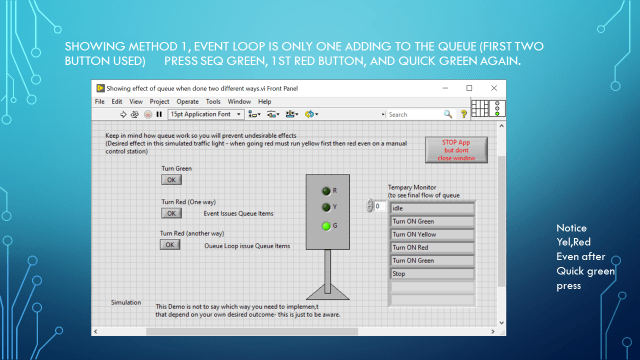
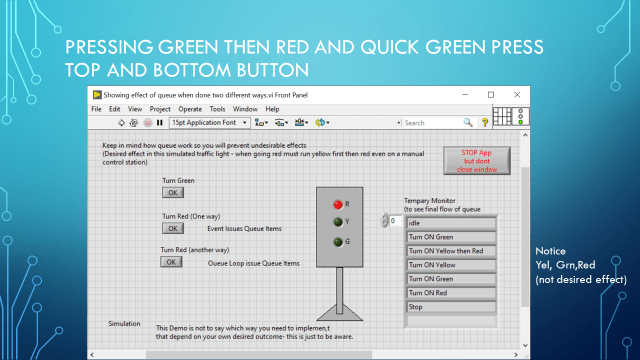
Using a simple simulated traffic light example to show two ways and effects when pressing button. More about seeing how queues work in two situations.
The desired effect is when going from Green to Red it should go Yellow then Red.
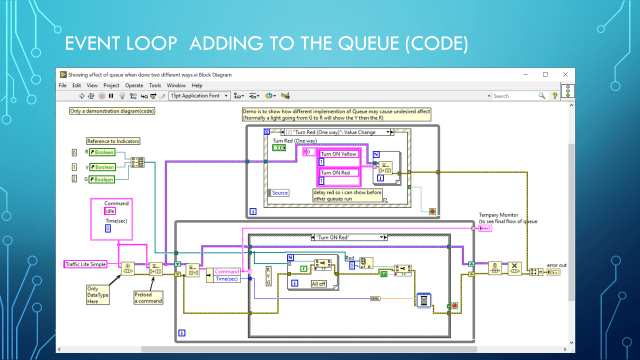
One is the Event Loop (which handle events like button pressing) adding to queue
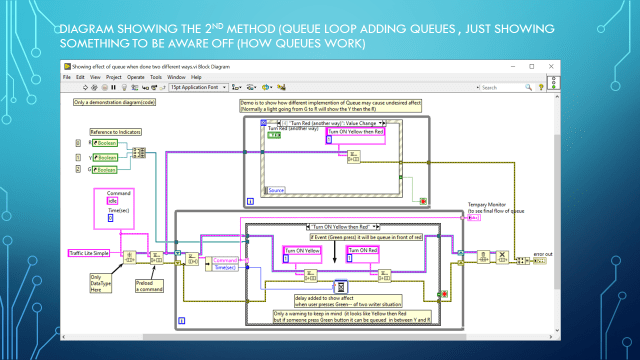
Next is queue elements added from inside the queue loop.
A delay was added in the second method to amplify the effect I want to show which is the Green button pressing adding to queue in between Yellow and Red if press quickly.
I press Green, then then Red button then the Green button again.
Below is the output(front panel) and the code(diagram)
Remember this presentation is not to show which one to use, it just to show different effects which can occur using queues.
LabVIEW® is a National Instrument product
This post is not connected or endorsed by any company.
Created to spark ideas on the subject.
Use at your own risk.

 Test Engineers Resource